An introduction to DuckDB
️Welcome!
Logistics
- All the important bookclub links are under Slack’s “Bookmarks” tab
- Potential guest speakers
Agenda
- Review Chapter 1
- Discuss the finer points of contributing to the bookclub github repository
Chapter 1
Learning Goals
- What is DuckDB and why bother learning to use it?
Basics
- DuckDB is a single-node, in-memory database that intergrates well into many places in the data pipeline.
- DuckDB is very fast - much faster than
dplyrorpandasfor data transformation. - The DuckDB IP is owned by the Netherlands Stichting (non-profit) DuckDB Foundation.
How Fast?
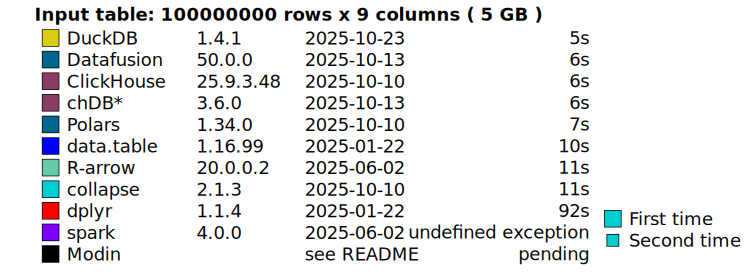
Source: DuckDB Labs
How Fast?
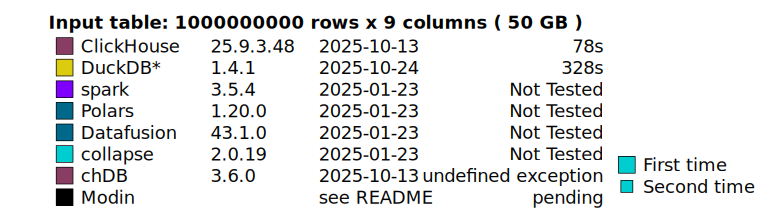
Source: DuckDB Labs
Where Does DuckDB Fit In?
- DuckDB is an “in process” database - it runs in another application’s memory space, like R or Python.
- It can speed up traditional “small data” workloads by interfacing with R or Python libraries.
- It can extend local analysis to data of “a few hundred gigabytes”.
- It operate directly “at the edge” or “in the cloud.” For instance, it can analyze data stored in a cloud S3 bucket in-memory, avoiding costly transfer operations.
Where Does DuckDB Fit In?
How much data?
Despite being in-memory, DuckDB allows analyses to “spillover” into the hard disk. What are the limits of this fallback?
Which process?
What counts as a “process” for in-process? The authors discuss querying S3 files from a Cloud VM instance “in process” - is this a serverless deployment of Python? What’s the “process” for the DuckDB CLI?
Where Not to Use DuckDB?
- Tranformation and analysis of very large data sets
- “Steaming data” in real-time without batching first (but see this DuckDB Lab’s blog post)
- Applications involving concurrent writes - traditional databases are still best for this.
How Can I use DuckDB?
- Using SQL!
- DuckDB has R and Python APIs that mirror dplyr and pandas syntax.
- But the SQL API appears to get “first class” treatment.
Supported File Types
- Parquet*
- In-memory dataframes
- CSV
- JSON
- Apache Arrow columnar shaped data
- Cloud buckets like S3 or GCP
- DuckDB database format (.duckdb)
DuckDB SQL
- Supported data structures include “traditional” SQL ones:
varchar,numeric, etc. - It also supports some data types not common for databases but well known in programming languaes: enums, lists, maps (dictionaries) and structs.
DuckDB SQL
- DuckDB’s Friendly SQL eliminates some common SQL pain points.
- For instance, you can select of the columns in a table using
SELECT *instead of enumerating every column name. - DuckDB includes a range of aggregation functions, grouping functions, and support for SQL features like common table expressions.
Interacting with Bookclub Github Repository
Overview
- The repo is at https://github.com/r4ds/bookclub-duckdb
- We will write a “book” as we upload our presentations to this repo
- Under the hood, the bookclub repository uses quarto and github actions to render a slick website
- The book covers a few different technologies. Here is how I have managed the Python, R and SQL dependencies
Fork and Clone
The repo contains excellent instructions for updating the repository using R and the
usethispackage.If you do not use R, the gist is to create a personal fork of the repository, make your changes to that fork, and then push your changges back to main repository.
Make sure your fork is up to date with the main repository!
Edit Chapter Files
- You can edit the
.qmdfile for the the chapter you are presenting under/slides/xx.qmd. - To render in a presentation-friendly, slideshow format use revealjs.
- From the command line:
- Or using the
YAMLheader:
- By default, slides render to
/_site/slides/xx.html
Dependency Management
To render the book chapters on your local machine, you need to load the R dependencies listed in the
DESCRIPTIONfile. You need these even if your presentation has no R code in it.There are no Python dependencies right now, but once we hit that point we will record them in
pyproject.tomlin the repository.
Installing R dependencies
- Here is an automated way to load the correct R dependencies using
pakandrenv:
## Install pak and renv
if (!requireNamespace("pak", quietly = TRUE)) {
install.packages("pak", repos = sprintf(
  "https://r-lib.github.io/p/pak/stable/%s/%s/%s",
  .Platform$pkgType,
  R.Version()$os,
  R.Version()$arch
))
}
if (!requireNamespace("renv", quietly = TRUE)) {
  pak::pkg_install("renv")
}
## Configure renv to use pak to install packages
renv::config$pak.enabled(TRUE)
## Configure renv to snapshot dependencies from the DESCRIPTION file
renv::settings$snapshot.type("explicit")

## Install the project dependencies
pak::pkg_install(renv::dependencies(path = "DESCRIPTION"))
Installing Python dependencies
- If you add any Python code to your presentation, you will need to add Python dependencies.
- An easy way to do this is to install UV
- You can sync your local machine with the Python dependencies:
Adding Packages
- If you add any new R or Python packages to your local repository, you should make sure those dependencies get reflected in the main repository.
- If you add R dependencies, make sure to update
DESCRIPTIONand commit the changes
- If you add Python dependencies, make sure to update
pyproject.toml(UV does this automatically)
Adding Packages
- Generally, with this setup you should commit and push changes to
pyproject.tomlandDESCRIPTION, but not changes torenv.lockanduv.lock
SQL Chunks in Quarto
- Quarto can execute SQL code chunks if we provide it an appropriate database backend (thanks to this blog post).
- You can define the database in R or Python, and then pass it as a quarto chunk option.
- To create the database connection in R or Python:
or, in Python
SQL Chunks in Quarto
Then, to create the chunk:
Quarto Execution Option - Freeze
The book covers a lot different technolgies, and we may tire of troubleshooting dependencies in the main repo.
Quarto’s “freeze” option is a quick fix to this issue. It will tell the rendering pipeline in the main repo not to render that chapter and instead pull the .html file from
_freeze/slides/xx/.In the top level YAML, use:
- If you use this method, make sure sure to commit changes to
_freeze/slides/xxto the repository!
Next week
- Chapter 2 is quite short and Chapter 3 is longer - should we bundle/split?